Let us introduce you to VigLink, an awesome affiliate software which automatically places affiliate links on your blog from thousands of affiliate programs related to your niche, without ugly ads popping up everywhere!
We get it here at Astute Copy Blogging! When you’re just starting out as a blogger, monetizing a blog can be challenging.
No, scratch that. As a new blogger, it is a lot of hard work to monetize your blog. And it can be very overwhelming.
Where do you start? There are so many products, services and companies to promote, so many applications to make, so many forms to complete, and so many passwords to remember. And how do you keep a tab of them?
And can I be honest? Those income reports of bloggers who (against all the odds) somehow manage to make thousands of dollars in their first month of blogging don’t help. at all.
Right ?
But what if there was an easier way?
Like, how to monetize your blog without Google Adsense. Or how to make money blogging without ads. To be honest, we must go beyond learning how to how to add ads between posts in blogger or how to monetize a blog with Adsense because some of those ads are tacky and very irritating.
Trust me.
If there is an easier way, I will find it for **you**! That’s because here at Astute Copy Blogging, one of our specialties is helping you make money from your blog. For this reason we are constantly trying out new affiliate networks that sound promising. So, as you can imagine, I got really excited when I heard about VigLink. It sounded really interesting, so I decided to try it out.
Below is my honest and unbiased Viglink review.
Let’s get started!

Quick Navigation
Understanding Affiliate Marketing
But first, let me provide some information on affiliate marketing, especially for new bloggers who may be reading this blog post.
Affiliate marketing is the process of earning a commission by promoting other people’s (or company’s) products. In affiliate marketing, we recommend products to our readers, and if they decide to buy the product using the unique affiliate URL we provide, then we get a referral income from the purchase. It is a marketing arrangement by which an online retailer pays commission to an external website for traffic or sales generated from its referrals.
Simply put, you find a product you like, promote it to others and earn some of the profit for each sale that you make.


The VigLink Review
Instead of signing up on different affiliate programs, inserting affiliate links manually, and having all kinds of ads blinking all over your blog, let me introduce you to VigLink. This is an awesome affiliate software that automatically places affiliate links on your blog from thousands of affiliate programs related to your niche, without ugly ads popping up everywhere. Trust me, some of those blog ads suck, and they make you look like an amateur blogger!
Sorry!
How VigLink Works
VigLink is one of the best ways to monetize your blog. VigLink works by converting your normal outgoing links into affiliate links, and if users make a purchase, you earn a referral commission from it.
The best part is that you don’t need to be signed up for an individual affiliate account on all networks. Viglink tracking takes care of all of them!
As a blogger, depending on your niche, you’re linking to different products on many websites in your blog posts. But you don’t make any money when people buy or download those products. VigLink makes it super easy for you to monetize those links.
For example, if you have a travel blog and you write about (and provide links to) holiday destinations, hotels, flights and travel apps, VigLink will automatically convert those outbound links into affiliate links. When you would normally make no money for such links, with Viglink you will be earning money whenever somebody books a hotel, flight or holiday from any of those sites.
VigLink automatically monetizes all outbound links, allowing you to make a fantastic income from them. VigLink does all this through Javascript, so it’s SEO friendly and I understand that it works with AdSense as well.
It is supported on the following platforms:
- Blogger
- phpBB
- Tumblr
- Typepad
- vBulletin
- WordPress
It is also important to note that if you are already using affiliate links on your website, VigLink does not change those links. Setting up VigLink is easy, and all you need to do is add a line of code to your site source, and VigLink will take care of the rest.
Getting Started
Here’s how to get started:
- Go over here to sign up for an account. Enter your email address and you will receive an email. Click the link in the email to verify your account, and you’re nearly there! Registration is very easy and takes less than 1 hour!
- Next, you will need to install the plugin. You can click here to download the Viglink WordPress Plugin, which you then need to upload to your blog or website.
- Once you’ve activated the plugin, you will need to enter the API key which is available from your VigLink dashboard.
- Remember to provide your PayPal email address in the Account section of the VigLink dashboard.
- Start writing awesome and compelling content and linking to products and services around the web.
- Viglink automatically monetizes the link.
- Next, make sure you provide a Disclosure of Material Connection or you maybe breaking the law 🙁 Here’s mine (which you can find at the bottom of this post) that you can copy 🙂 :Disclosure of Material Connection: Some of the links in the post above are “affiliate links.” This means if you click on the link and purchase the item, I will receive an affiliate commission.
I’m trying to make my Viglink review as helpful as possible, so here’s a short video clip that shows just how easy it is to install the VigLink plugin:
What If You Don’t Want Another Plugin?
Kevin J Duncan once said that plugins are like potato chips. When you start out, you plan on only having one or two. Next thing you know the entire bag is gone. For WordPress users, what starts out as a handful of “essential” plugins soon turns into a baker’s dozen. Times three. Plus eleven. Plugins slow down your site. They break. They have to be updated over and over.
Because of these challenges, some people are wary of installing more plugins. And quite rightly so! If this is you, VigLink has got you covered. You can install VigLink using the HTML code. Simply watch this video clip to see how to do it:
Good News: India And France Are Now On Board
As of April 2016, VigLink partnered with Effinity & vCommission. Consequently, Bloggers from France and India can now earn money through VigLink. This is fantastic because vCommission has a huge database of Indian affiliate programs including Amazon India, Flipkart, MakeMyTrip, Snapdeal, Paytm and PriceMinister (Rakuten).
How Viglink Payments Work
VigLink pays you 75% of any affiliate income you earn, and they keep 25%, which I think is awesome! VigLink offers payment via four options: (1) PayPal; (2) ACH (USA-based accounts); (3) Check (USA-based accounts); and (4) Wire (non-USA-based accounts).
To set up payment, VigLink requires the following information for the respective options:
- PayPal
- Registered PayPal email address
- ACH (USA-based accounts)
- Payment contact email address
- Bank account number
- Bank routing number
- Completed and signed W-9
- Check (USA-based accounts)
- Payment contact email address
- Bank account number
- Bank routing number
- Completed and signed W-9
- Wire (non-USA-based accounts)
- Payment contact email address
- Beneficiary bank account number
- Beneficiary bank account owner name
- Beneficiary bank account owner address
- Beneficiary bank ABA or SWIFT code
- Completed and signed W-8BEN
This information should be sent via email to support@viglink.com with “Payment Update” in the subject line.
Payment Threshold
VigLink pays once per month, generally 60 days after driving a sale (“net-60”). Payments are typically issued on one of the last five (5) business days of the month; however, this can extend to the first five (5) business days of the new month. For example, your earnings for June will be paid out by September 5. The payment thresholds for issuance are > $10 for PayPal and > $50 for ACH, check and wire. If your earnings do not exceed these thresholds, unpaid earnings will roll into each subsequent month’s earnings until they exceed the payment thresholds.
How to Monetize Your Blog – The 3 VigLink Products
VigLink has three main products – Convert, Insert, and Anywhere. Here’s a quick roundup of each one to give you a clearer understanding of their capabilities.
VigLink Convert
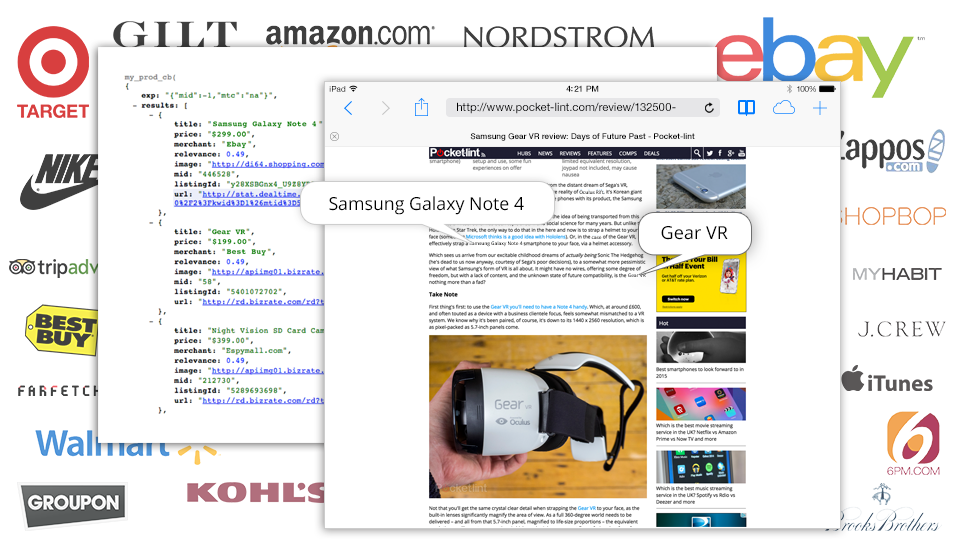
Convert takes your unaffiliated merchant links and automatically affiliates them on the click. Did you write a post on your blog in 2008 linking out to 2008 Pulitzer Prize-winning novel The Brief Wondrous Life of Oscar Wao by Junot Diaz on Amazon? Don’t worry about it: VigLink Convert will see that Amazon link and turn it into an affiliate link. It’s that simple!
 VigLink Insert
Insert scans your site for common product terms or merchant mentions and adds an affiliate link. Say one of your readers leaves a comment on your article on your tech blog mentioning how much she loves her iPhone 6 but didn’t hyperlink the term. Your other readers might be persuaded to buy an iPhone—and VigLink Insert would help you capture that purchase intent by automatically adding an affiliate link to a merchant selling iPhones.
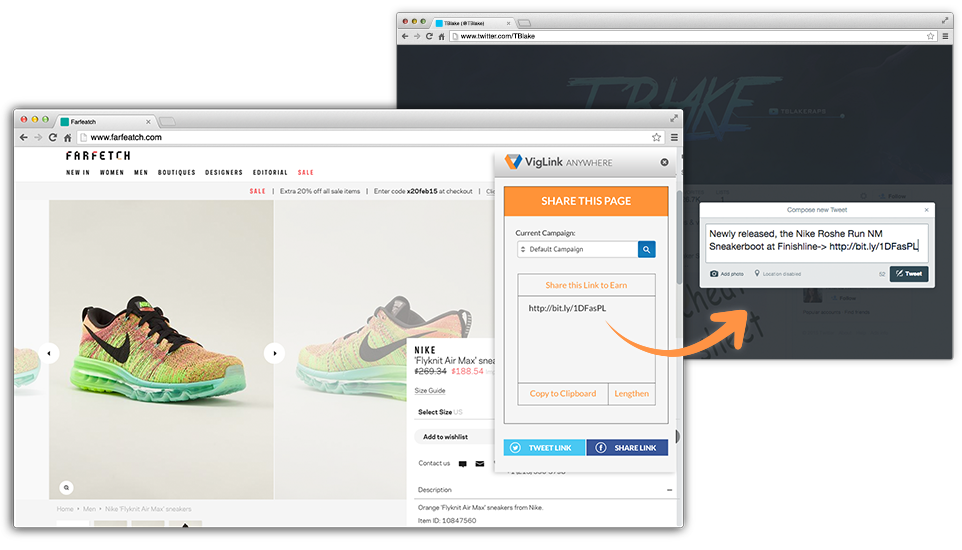
VigLink Anywhere
Anywhere is your solution if you can’t install the VigLink JavaScript to take advantage of Convert and Insert. You can also earn from links you post to Twitter, Facebook or even emails. Just build the URL with VigLink Anywhere and share anywhere. Get paid when clicks turn into purchases. VigLink Anywhere allows you to create links to affiliate products and websites and earn money by posting the links on YouTube, Facebook, Twitter and emails.
For instance, say you’ve started a Facebook group dedicated to pet merchandise. Grab your PetSmart link to those travel-friendly pet bowls you love and navigate to the Anywhere tab on your Dashboard > Create a Link and paste the URL into the box where it says “Enter a URL.” You’ll return a link wrapped in VigLink redirects. Now you have a portable link (and your readers can purchase some portable pet bowls!)
Here is a short video clip that explains how Anywhere works:
VigLink Review FAQ- Your Questions Answered!
This VigLink review would be incomplete without an FAQ section answering your most pressing questions.
Agree?
#1- Can You Make Money With Viglink?
VigLink is one of the best ways for bloggers to make money online. This is especially true for newbie bloggers who never have a lot of traffic on their site. By using VigLink you convert every outbound link into an affiliate link and this exponentially increases your chances of making commissions.
#2- Does VigLink Work Amazon Affiliate Program?
VigLink used to work with the Amazon referral program, but Amazon changed the rules and nowadays VigLink does not work with the Amazon affiliate program.
#3- How Do I add VigLink Code Onto My Site?
There isn’t room for it here in my VigLink review, but here’s a video tutorial with detailed instructions.
#4- How May Merchants are on VigLink?
There are thousands of individual merchants inside the VigLink platform and across all inches.
If you were to join, you’re literally guaranteed to be able to monetize your blog with VigLink.
VigLink Review and Recommendation- A Viable Way to Monetize a Blog?
Are you already providing valuable content that your readers love? Have you got people visiting your blog? Wouldn’t it be awesome if you could earn money from your written content without inserting any Banner ads? Wouldn’t it be wonderful to turn your blog posts into an automatic money making machine? One that makes money for you on autopilot! Here’s your opportunity. Sign up to VigLink today!
Question: How do you monetize your blog? What did you think of this VigLink review?
Click here to leave a comment and join the conversation.
Disclosure of material connection
Some of the links in this article are “affiliate links” as defined by the FTC. This means if you click on the link and purchase the item, Astute Copy Blogging will receive an affiliate commission, at no additional cost to you. However, please note that we only recommend the best products and services.


Wow, this sounds awesome. Just a quick little question – it will not work on a free WordPress.com site, will it?
Thanks for the info. Really keen to give this a go when I have the right level of blog upgrade.
Hey Belinda,
Thanks for stopping by. Yes, VigLink is simply awesome 🙂 Unfortunately, I don’t think it can work on a free WordPress site because you can’t add non-built-in plugins to a WordPress.com site. Plus, no blogger initiated advertising for driving traffic to third party sites is allowed on wordpress.com hosted blogs. PPC is not allowed. Affiliate marketing banners and any and all advertising outside of WordAds at WordPress.com are not allowed.
So you definitely need to upgrade to a self-hosted WordPress site to be able to use VigLink.
If you need any help setting up your self-hosted WordPress site, check out this article: How To Set Up A Blog On WordPress In 15 Minutes Or Less [Step-By-Step Guide]
Best regards,
Pedro
As I suspected. Thanks so much for your reply to my query. I will self host it’s just a matter of when… (funds, ya know).
You’re most welcome Belinda 🙂
Saving this for later. Thank you
Hi Victoria,
That’s music to my ears 🙂 Let me have your thoughts when you’ve had the opportunity to read it.
Best regards,
Pedro
Pedro,
Good information…… I didn’t know that one plugin is enough for monetizing your blog.
Thanks for sharing..
Hey EnN KaY,
Now you know..lol 🙂 Although there are alternatives, most people find that VigLink is the only plugin they need to effectively monetize their blog content.
Best regards,
Pedro
Hey Pedro,
Very helpful article. Keep it up !!
Hey Prachi,
Will do ..lol 🙂
But seriously, thank you for stopping by!
Best regards,
Pedro
Very helpful information! My goal in Sept as a blogger was to begin monetizing. I wasn’t sure how to start but you gave me some ideas. Unfortunately I don’t add many links to my blog so I’m not sure this plugin would be beneficial to me but just in case, I’ll save your post 😉
MsQueenRo.com
Hey MsGueenRo,
Delighted you found the blog post helpful. The good thing about VigLink Convert is that if you mention any products in your blog post, even if you don’t have any links, it will convert those products to links!
Good luck with your goal of monetizing in September.
Best regards,
Pedro
Really great post! I’ve been struggling to find ways to monetize my blog, but didn’t like the aesthetic look of all the ads on my blog (I’m vain, what can I say lol!) I’m not sure if this plug in works with Wix, since you didn’t list it, but I’m certainly gonna check! Thanks for all the info. You’re the bomb!
Hi Kristi,
Thanks for stopping by and sharing your thoughts on the conversation. Totally agree with you that blog ads suck 🙂 Don’t think VigLink supports Wix. I will investigate and report back.
Best regards,
Pedro
I wish I was self hosted or i would totally be doing this! Unfortunately I’m under WordPress and I paid for their business plan so I just can’t add any type of plug in I want.
Hi Felicia,
Thanks for stopping by and sharing your experience. VigLink is awesome but I think with WordPress, it’s got to be selfhosted 🙁
Best regards,
Pedro
Pedro this is fantastic! I’ve been a Viglink affiliate for a while now and had no idea of these options! Now I have a new challenge…to figure out how to implement this information!
Hey Serena,
Delighted to see you here on Astute Copy Blogging. And really glad that you found the article useful 🙂
Good luck with implementing this new information!
Best regards,
Pedro
This post is really helpful and insightful for those willing to monetise their blogs. Good job.
Hey Mary,
Thanks for stopping by and sharing your thoughts 🙂
Best regards,
Pedro
Great tip. I will have to look into this for my blog. Thank you for sharing.
Hi Kristyn,
Thanks for stopping by. Delighted you found the article useful 🙂
Best regards,
Pedro
Thank you so much for sharing this with us!!!! This is going to make my blogging so much easier and I appreciate the info!
Hi Shell,
This is music to my ears!! I’m really delighted you found the article useful. Hopefully it can revolutionize the way you monetize your content. Let us know how you get on 🙂
Best regards,
Pedro
Hey Pedro,
I think affiliate marketing is the best way to monetize your blog. Great post!
Hi Nitin,
Affiliate marketing is a great way to monetize one’s blog. But as your influence and audience grows, you will need to consider coaching, consulting and selling courses (Product Launch type courses) all which can be very very profitable 🙂
Thanks for sharing your thoughts.
Best regards,
Pedro
Hey Pedro
Thank you for this. I need to try it.
Best,
Patrick
Hi Patrick,
Thanks for stopping by! Glad you like VigLink enough to want to try it 🙂 Let us have some feedback once you’ve tried it!
Best regards,
Pedro
Hi Pedro
I had quite forgotten about VigLink but have written on sites that use it in the past. I didn’t realize it worked on Blogger blogs, though.
Hi Kyla,
Thanks for stopping by and sharing your experience 🙂 VigLink are always working to add more platforms and right now, Blogger blogs are supported. Click here for information on how to install VigLink on Blogger.
Best regards,
Pedro
Pedro,
Sounds really interesting and think I will check into this closer.
Hey Candy,
That’s great to know 🙂
Best regards,
Pedro
Hi Pedro,
Good to know! My site doesn’t require ads, but adding plugins has confused me before so thanks for the tutorial!
Hi Hannah,
Thanks for stopping by. Super delighted you found the article useful 🙂
Best regards,
Pedro
Thanks so much sharing this. I’ll have to look into it as I’m trying to monetize my blog in the near future.
Hi Ellie,
Delighted you found the post useful. Good luck with your efforts to monetize your blog.
Best regards,
Pedro
Pedro,
Wow! This sounds awesome, though… I’m not very good in linking anything I mention on my blog and this looks like it could help, but wouldn’t it “overhypertext” everything on my blog and make it ugly
Hi Diana,
Thanks for stopping by and joining the conversation. And I really appreciate you sharing your concerns. I don’t think the VigLink links would overhypertext everything as you say. But I have reached out to VigLink and hopefully someone from VigLink customer support would join the conversation shortly and shed a bit more light.
Best regards,
Pedro
Hi Pedro,
Thank you so much. This is going to be a HUGE help to me. Can not wait to try it. And thank you for making it simple to understand. So many things are over my head right now as a new blogger and this was so refreshing to read!
Hey Ellen,
Thanks for stopping by and sharing your thoughts. Glad you love the article, and super excited that you think VigLink will be a huge help to you 🙂
Please let us know how you get on!
Best regards,
Pedro
This sounds really good and like it takes a lot of hassle out of linking all the products!
Hi Tori,
Delighted to hear that 🙂
Best regards,
Pedro
Pedro,
I have to check this plug in, it seems pretty amazing, and it is something I really need at this point.
Hey Elena,
VigLink is pretty awesome. I’m delighted you want to try it out 🙂
Let us know how you get on with it.
Best regards,
Pedro
Wow! It sounds like a very helpful plugin to have. I’m learning something new about affiliate marketing every day. It would be interesting to see how VigLink compares to just using your affiliate links, say from Amazon. Is it intended for those who don’t have an affiliate account? Thank you, Pedro, for a great article!
Hi Tanya,
Thanks for stopping by and sharing your thoughts. The great thing about VigLink is that you don’t have to register with different affiliate programs. In relation to Amazon, VigLink simplifies things. Here’s what I mean. Normally, if you have visitors from different countries to your blog, then you need to register with Amazon Associates in different countries to be able to earn. But with VigLink you don’t need to that. For instance, on the Amazon Associates UK website you have the following information:
“Will my Associates ID work in all countries? (e.g. can I use my Amazon.co.uk Associates ID in a US widget?)
No. Your Associates ID will only earn you referral fees from sales in the same locale as your Associate ID. For example, to earn referral fees from an Amazon.co.uk widget, you must be a member of the UK Associates program and use that UK Associates ID in your UK widget. You must sign up to be a member of the Associates program in each Amazon locale for which you will be building widgets. Ready to join? The links to join the Associates program in each country is listed below:
US: http://www.amazon.com/associates
CA: http://www.amazon.ca/associates
UK: http://www.amazon.co.uk/associates
DE: http://partnernet.amazon.de/gp/associates/join/main.html
FR: http://partenaires.amazon.fr/gp/associates/join
JP: http://www.amazon.co.jp/associates ”
See what I mean?
Also, with VigLink Insert, if you mention a product, they will insert an appropriate link for you. Hope this helps 🙂
Best regards,
Pedro
This is looks awesome!! Thank you for sharing with us 🙂
Hi Hra,
Glad you liked it 🙂
Best regards,
Pedro
Wow, this is a great tip. Cant wait to try Viglink on my blog. Adsense is great, but I know you can make more money only with affiliates.
Hi Vineeth,
Super excited to hear that you found the article helpful.
Best regards,
Pedro
Oh, wow. I never heard of this plugin before – thanks for the review! Certainly something to consider as I move forward with other sites! 🙂
Hi Zesty,
Thanks for stopping by. Really glad you found the post useful. Please keep us updated on your progress 🙂
Best regards,
Pedro